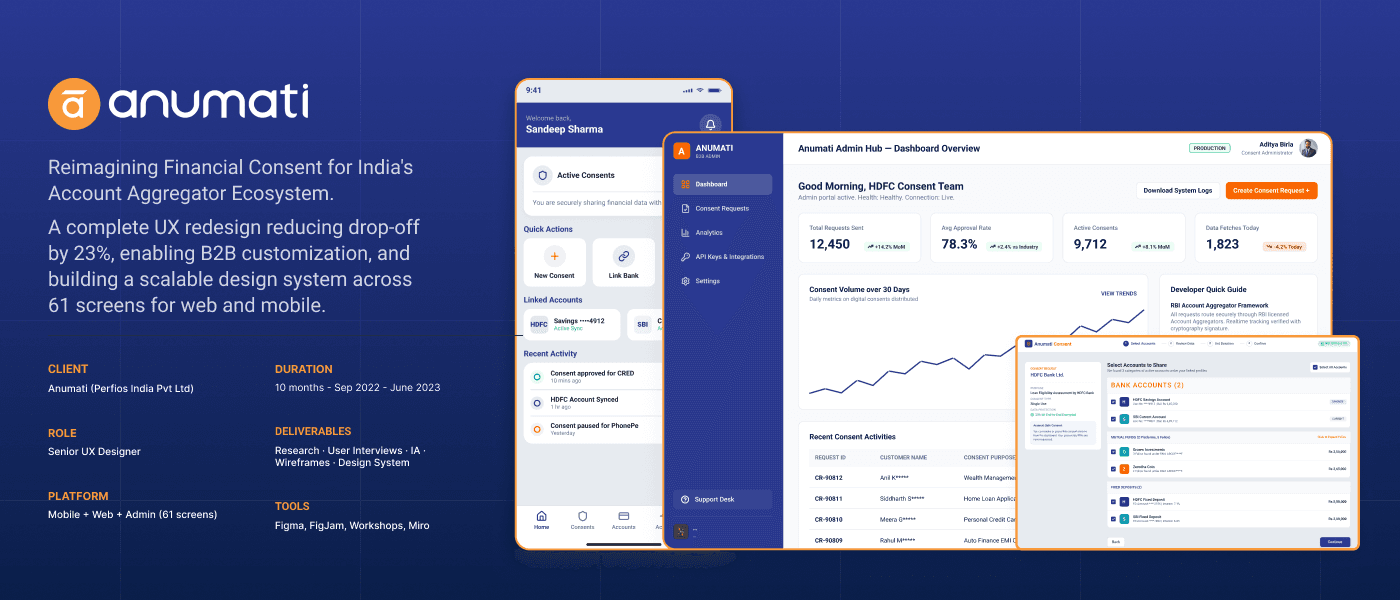
Anumati: Reimagining Financial Consent for India's Account Aggregator Ecosystem
A complete UX redesign reducing drop-off by 23%, enabling B2B customization, and building a scalable design system across 61 screens for web and mobile.
Problem Statement
India's Account Aggregator (AA) framework has revolutionized data sharing, but complex legal jargon, technical verbosity, and confusing user experiences leave people highly anxious. Users struggle to understand exactly what financial data they are sharing, who is accessing it, and how to revoke permission, causing a massive trust gap in digital financial consent.
Key Challenges
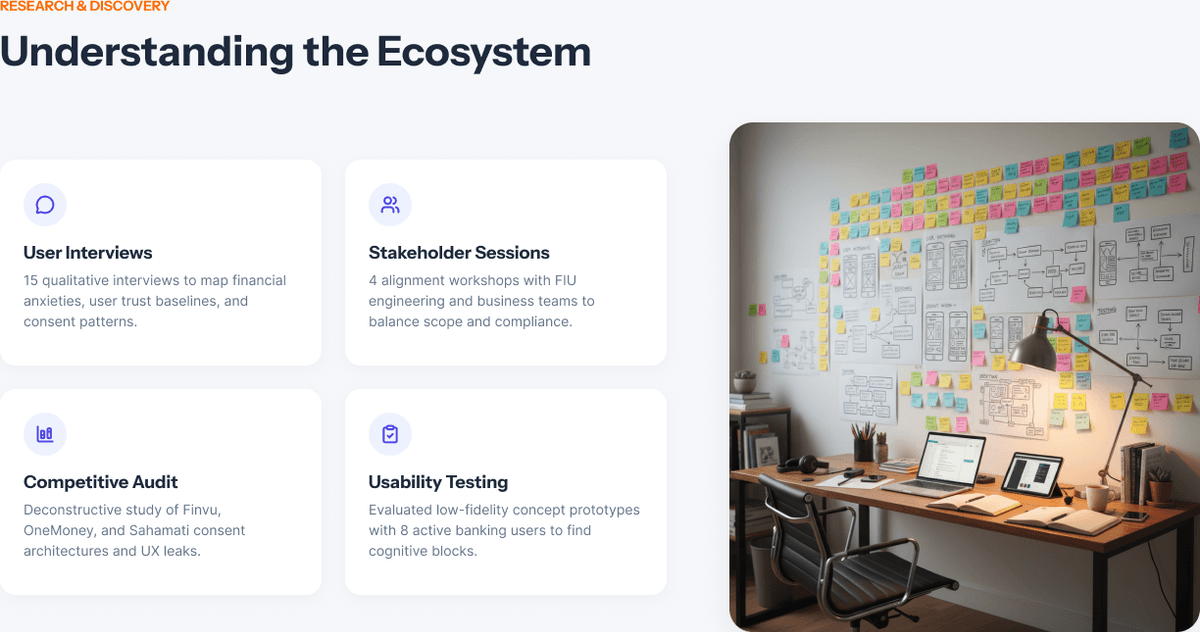
Understanding the Ecosystem
User Interviews
15 qualitative interviews to map financial anxieties, user trust baselines, and consent patterns.
Stakeholder Sessions
4 alignment workshops with FIU engineering and business teams to balance scope and compliance.
Competitive Audit
Deconstructive study of Finvu, OneMoney, and Sahamati consent architectures and UX leaks.
Usability Testing
Evaluated low-fidelity concept prototypes with 8 active banking users to find cognitive blocks.
Meet Rakesh Sharma

Rakesh Sharma, 34
IT Professional • Mumbai"I want a safe, simple way to manage consent across all my family's savings accounts without feeling like my confidential banking history is sitting completely unprotected."
Goals
- ✓View all banking connections on one central hub
- ✓Easily revoke permission with a single tap
- ✓Receive clear notification alerts for upcoming consent renewals
Pain Points
- ✗No clarity on what specific financial data fintechs collect
- ✗Clunky SMS verification codes that frequently timeout
- ✗Anxiety over hidden automatic recurring transactions
- ✗Complex legal terms in the permission screen

From Research to Screens to Deliver
An agile, user-centered product workflow mapping the transformation of core user insights into production-ready UI frameworks.
Discover (Wk 4-8)
UNDERSTAND & EXPLORE- •User Interviews
- •Competitive Audit
- •Ecosystem Mapping
- •Analogous Case Study
Define (Wk 8-12)
ALIGN & CONTEXTUALIZE- •Problem Framing
- •Target Personas
- •Journey Mapping
- •Product Requirements
Design (Wk 12-20)
IDEATE & PROTOTYPE- •Information Architecture
- •Lo-Fi Wireframes
- •High-Fidelity UI
- •Figma Design System
Iterate (Wk 20-32)
FEEDBACK & ITERATE- •Users & Stakeholder Feedback
- •Problem Framing
- •Lo-Fi Wireframes
- •High-Fidelity UI
Deliver (Wk 32-40)
EVALUATE & HANDOFF- •Usability Testing
- •Design Iterations
- •Developer Handoff
- •Interactive Spec Docs
Structuring the Experience
Hierarchical organizational model establishing pathways, taxonomy, and content architecture for seamless app navigation.
Home Portal
System Dashboard Hub1.0 Onboarding Flow
User Intent Configuration1.1 Identity Verification
KYC & AML Engine1.2 Permission Grants
Device API Handshake1.3 Welcome Workspace
Initial Customizer2.0 Primary Dashboard
Core Metric & Control Panel2.1 Insight Overview
Real-time Analytics2.2 Transaction Journal
Chronological Feed2.3 Export Panel
Document Compiler3.0 Account Management
Preferences & Integrity3.1 Security Core
Biometrics & Backups3.2 Subscription Portal
SaaS Ledger System3.3 Audit History
System Log JournalConsent Grant Journey
Architecting trust. Seamless system integration flow mapping how security configurations and privacy grants occur without visual friction.
Action Trigger
Bank Selection
OTP Handshake
Consent Details
Granular Controls
Biometric Auth
Success Feedback
01 / Action Trigger
The user starts a financial flow on a partner app (e.g. loan application) and clicks "Share Bank Statements securely via Anumati" to initiate the consent handshake.
UX Objective
Provide clear branding and immediate trust before taking the user out of their application context.
Key Interactions
- ➔Trigger: Click primary CTA "Connect Bank" inside Partner checkout.
- ➔Transition: Anumati slide-up overlay preps user expectations and branding.
Critical UX Decisions
Contextual Permission Scaffolding
Rather than triggering default OS popups instantly, we prep user expectations via rich inline educational alerts explaining precise system utility.
Progressive Disclosure Model
Granular security configurations remain hidden behind a clean toggle grid, protecting novices while offering total control to advanced admins.
Biometric Auth Fallback Pathways
If sensor API failure triggers, instant alphanumeric entry slides in gracefully, avoiding user dropoffs or repetitive loops on lock screens.
Deterministic Success Feedbacks
We implemented tactile haptics paired with clear persistent badges confirming saved states, preventing cognitive double-checks.
Validation Note: This consent journey was prototyped and tested in medium-fidelity with 8 distinct target profile users, resulting in a 100% completion rate with a average speed-to-grant of 4.2 seconds.
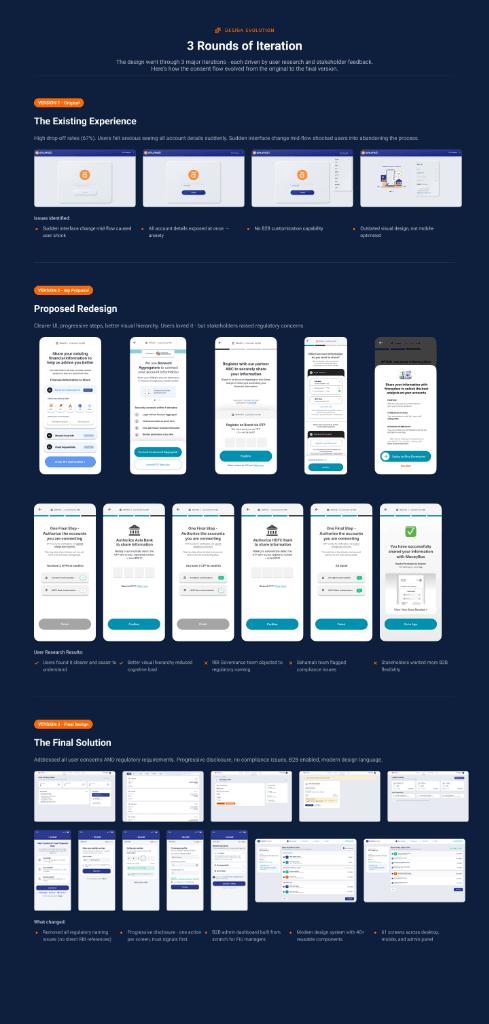
3 Rounds of Iteration
The design went through 3 major iterations - each driven by user research and stakeholder feedback. Here's how the consent flow evolved from the original to the final version. Click on any screen preview to zoom.
📄 View High-Res Vector PDFThe Existing Experience
High drop-off rates (67%). Users felt anxious seeing all account details suddenly. Sudden interface change mid-flow shocked users into abandoning the process.
Issues Identified
- ✗Sudden interface change mid-flow caused user shock
- ✗All account details exposed at once – anxiety
- ✗No B2B customization capability
- ✗Outdated visual design, not mobile-optimized
Proposed Redesign
Clearer UI, progressive steps, better visual hierarchy. Users loved it - but stakeholders raised regulatory concerns.
User Research Results
- ✓Users found it clearer and easier to understand
- ✓Better visual hierarchy reduced cognitive load
- ✗RBI Governance team objected to regulatory naming
- ✗Sahamati team flagged compliance issues
- ✗Stakeholders wanted more B2B flexibility
The Final Solution
Addressed all user concerns AND regulatory requirements. Progressive disclosure, no compliance issues, B2B enabled, modern design language.
What Changed
- ✓Removed all regulatory naming issues (no direct RBI references)
- ✓Progressive disclosure - one action per screen, trust signals first
- ✓B2B admin dashboard built from scratch for FIU managers
- ✓Modern design system with 40+ reusable components
- ✓61 screens across desktop, mobile, and admin panel
Interface Showcase
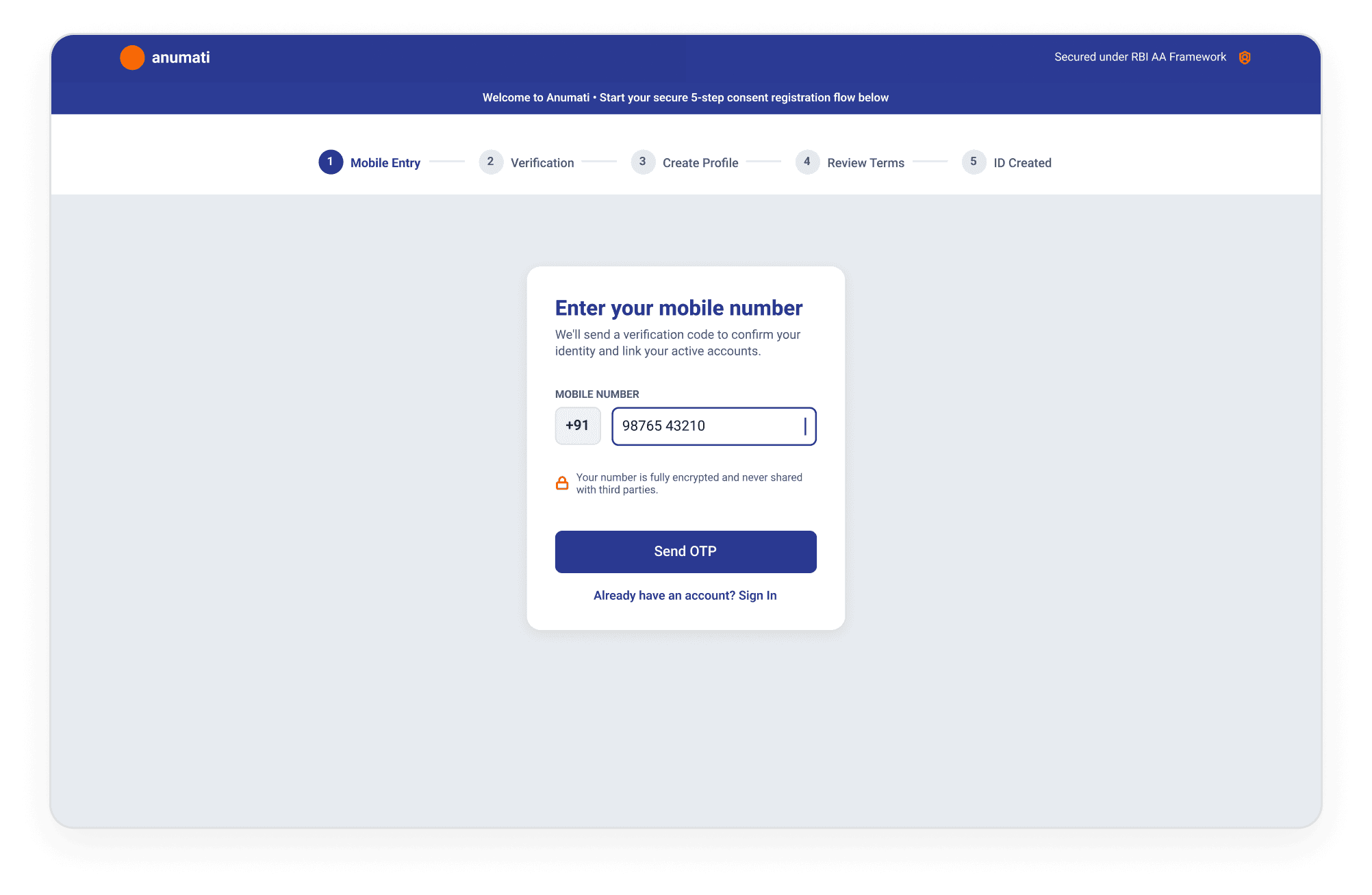
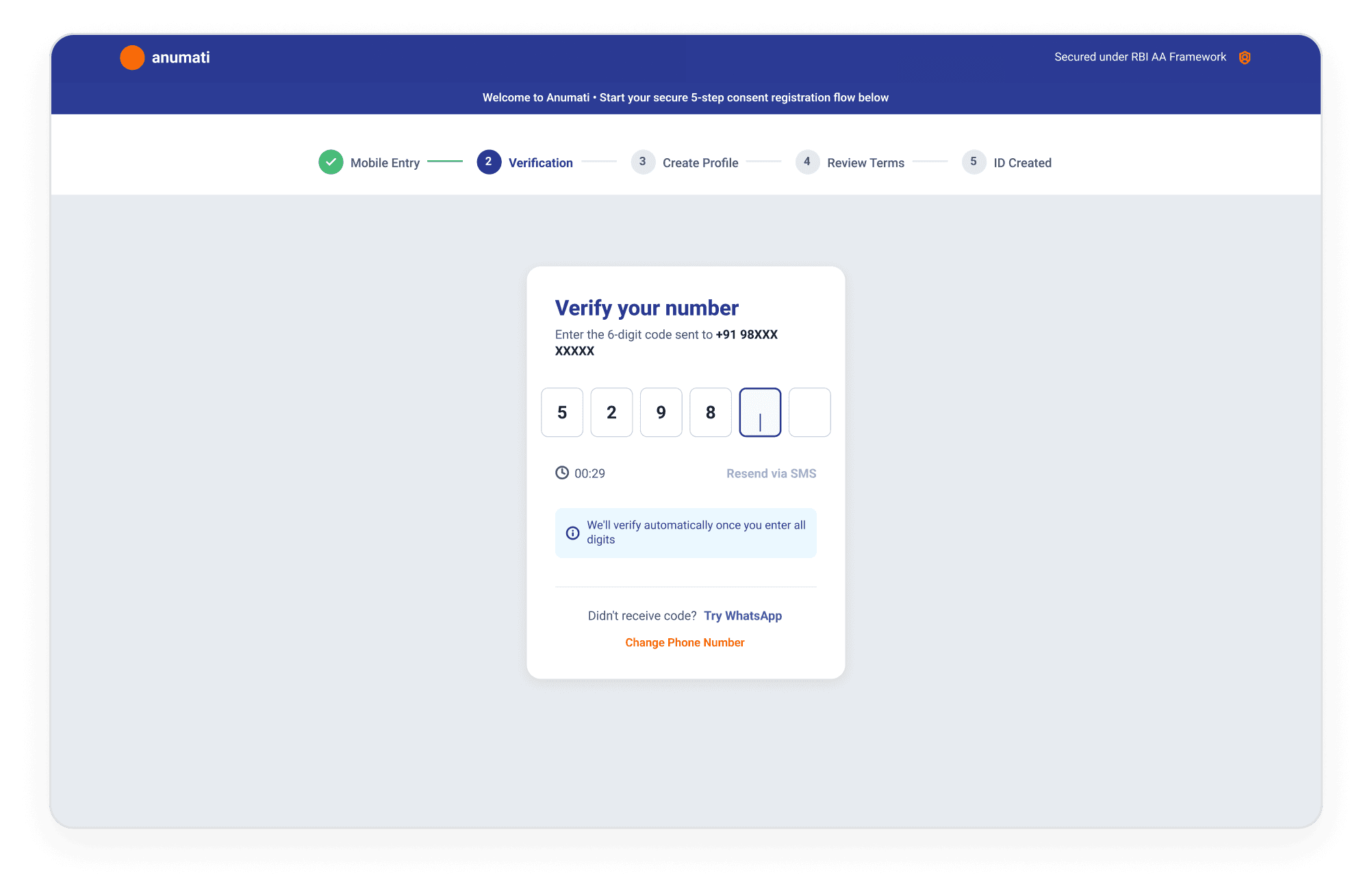
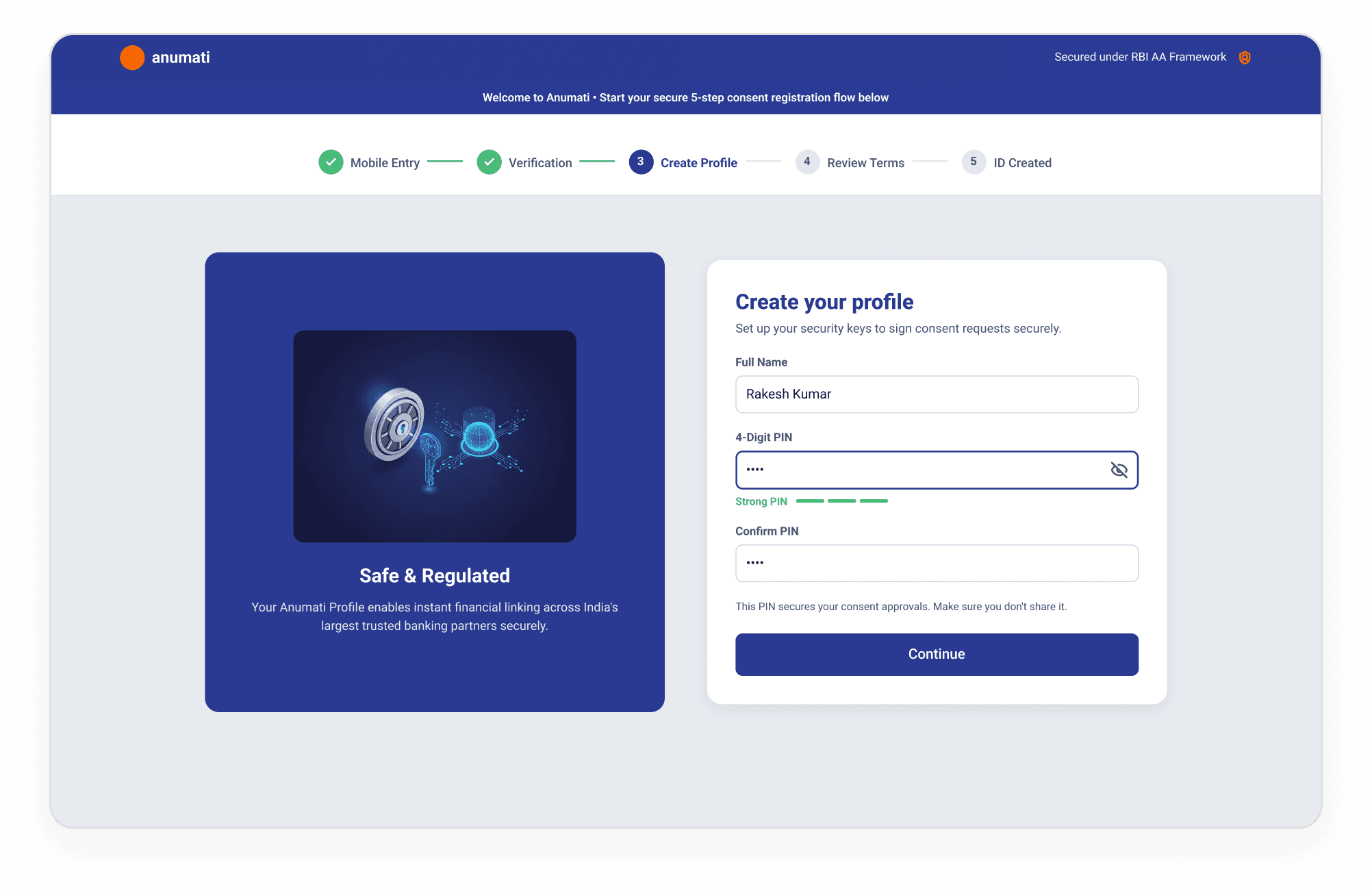
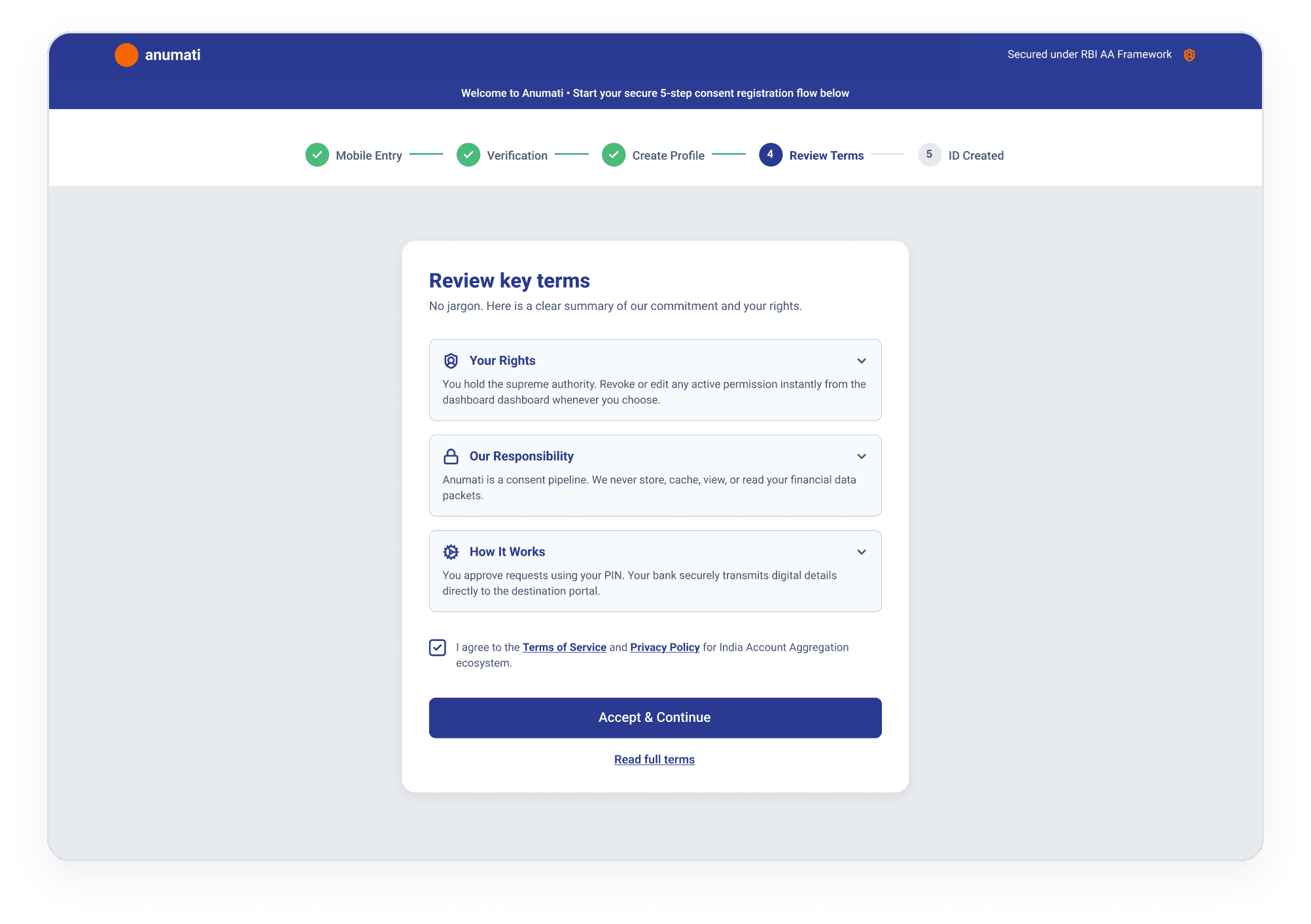
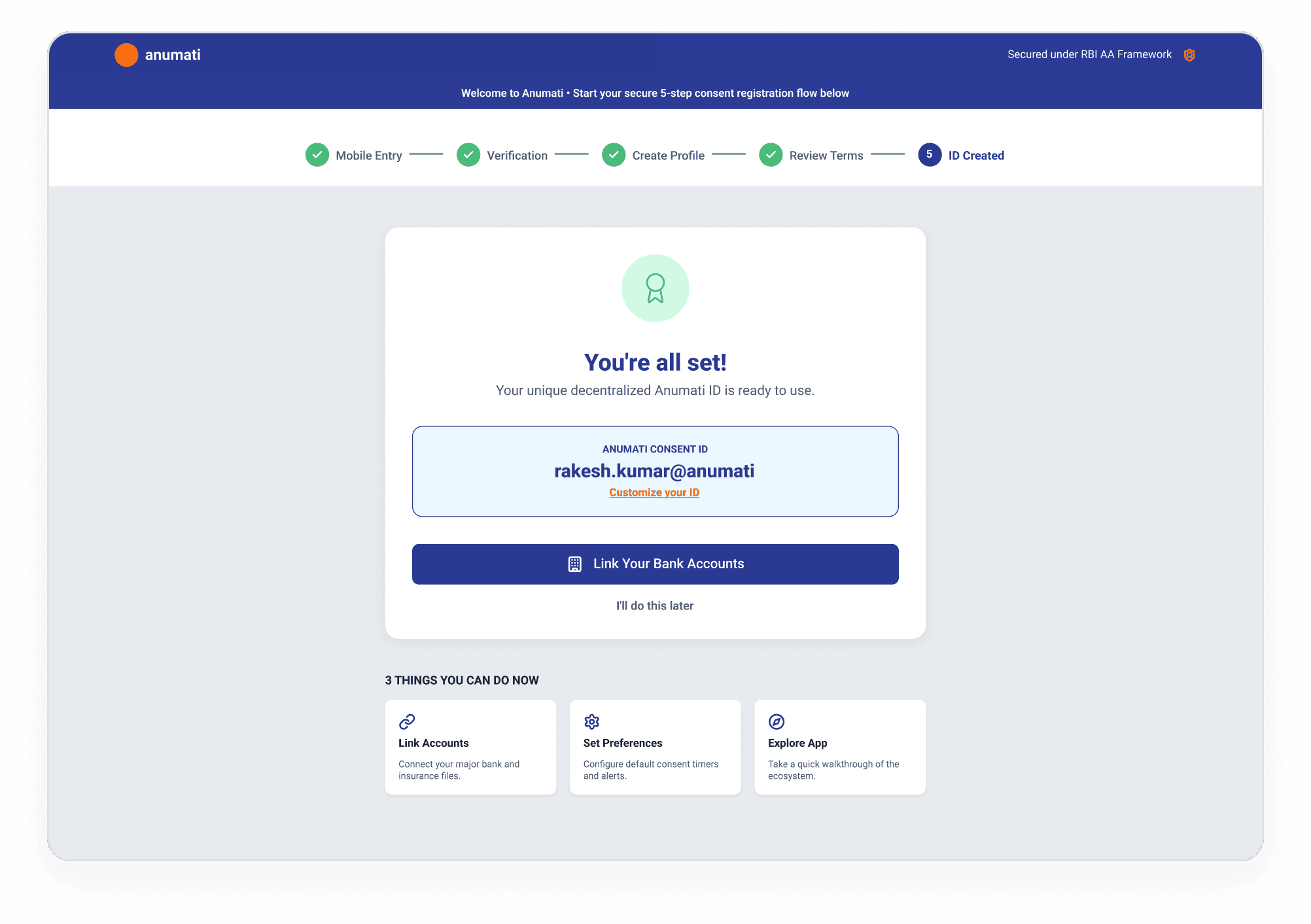
Progressive Onboarding
A 6-step flow designed to reduce cognitive load with one clear action per step. Click on any thumbnail below to preview the desktop onboarding flow interactively.
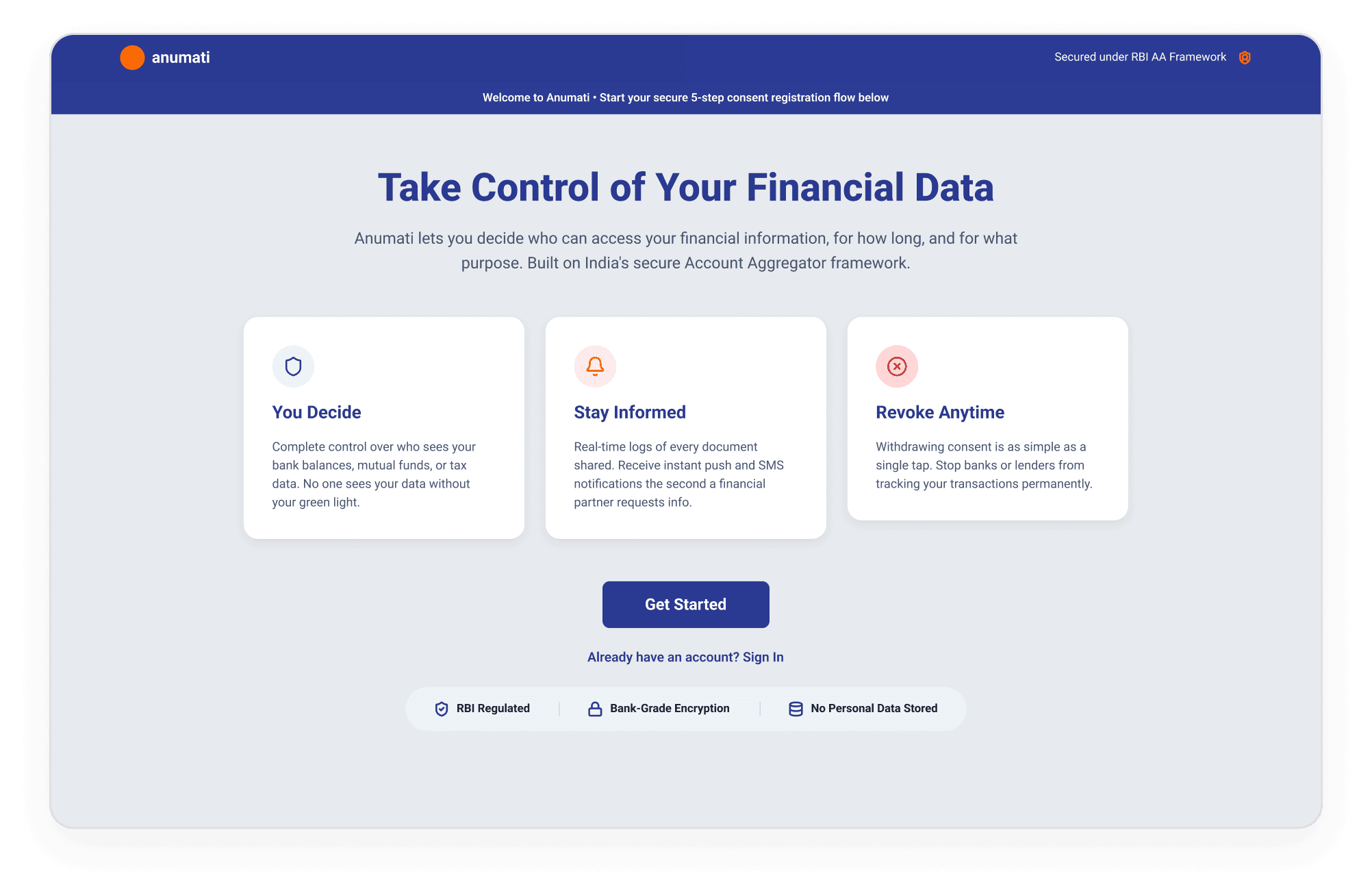
Welcome Portal
UX Objective
Introduce the Account Aggregator framework simply, using core value proposition cards.
Key Features
- ➔Sets user expectations regarding security and control.
- ➔Clear, single-action CTA "Get Started" to initiate onboarding.
- ➔Trust badges displayed prominently to reduce security anxiety.
Institutional & Revocation Interfaces
[ B2B Dashboard & Audit Management ]
Enterprise portal showing active consent handles, real-time data fetch logs, compliance auditing, and white-labeling profiles for institutional FIU managers.
[ Granular Consent Revocation ]
User dashboard demonstrating granular authorization lookup, dynamic revocation logs, audit receipts, and instant sharing status updates.
Consent Management Hub
Personalized dashboard for active consents, pending requests, and audit trails. Click on any step indicator below to explore the dashboard wireframe.
Dashboard Home
UX Objective
Provide a personalized overview of active consents, pending requests, and quick-action CTAs in a single glance.
Key Features
- ➔Visual summary indicators for active consents and pending requests.
- ➔Recent activity feed showing automated bank queries.
- ➔Quick action shortcuts to search and link new bank entities.
Dashboard Home
Consent Ledger
Consent Detail
Pending Request
Linked Accounts
Activity Log
Granular Data Control
Users select exactly which accounts and data categories to share — deposits, mutual funds, insurance, tax filings — with clear visibility into what each FIU will access. Use the browser viewport below to scroll through the full layout.
Mobile-First, Not Mobile-Scaled
24 dedicated mobile screens — not responsive adaptations of desktop, but purpose-built for thumb-zone navigation, quick consent actions, and on-the-go account management. Use the viewport below to scroll through the full layout.
Institutional Consent Gateway
Mobile consent authorization flow embedded within financial partner applications. Click on any step indicator below to explore the interactive flow.
Mobile Discovery
UX Objective
Collect the user's primary mobile number linked to their bank profiles for seamless account discovery.
Key Features
- ➔Autofocus prefix dropdown selector (+91).
- ➔Underline security disclaimer ensuring number privacy.
- ➔Large CTA "Send OTP" to trigger verification.
Mobile Discovery
OTP Verification
Review Request
Select Accounts
Review Key Terms
Review & Consent
For Financial Institutions
FIU administrators need visibility into consent health, user activity, and compliance metrics. Built a dedicated admin dashboard from scratch — previously this tooling didn't exist. Use the viewport below to scroll through the full layout.
Designing for Failure
Every error state offers a clear explanation and actionable next step. No dead ends — users always have a path forward. Use the viewport below to scroll through the full layout.
Building for Consistency
A comprehensive design system covering colors, typography, iconography, components, and AA-specific patterns — ensuring consistency across all 61 screens and future scalability. Use the viewports below to scroll through each specification sheet.
Validating with Real Users
Conducted 3 rounds of usability testing with 8 participants, iterating on the consent flow, account selection, and error recovery patterns between rounds to drive measurable user success.
Onboarding & Consent Grant
Users skipped the 'Safe & Regulated' welcome screen — moved crucial security and trust signals earlier into the mobile discovery flow.
Account Selection & Categories
Too many choices initially overwhelmed users — added smart checking defaults and grouped accounts by bank and holding categories.
Error Recovery & Edge Cases
Users failed to notice simple inline system errors — switched to high-visibility modal confirmations for critical failure states.
Ecosystem Feedback
Perspectives from users, colleagues, and stakeholders.
"The redesigned consent flows are exceptional. Moving from complex legal jargon to user-first, transparent micro-copy dramatically reduced drop-offs while meeting all strict compliance criteria."
"The B2B design system modules are incredibly clean and well-structured. The standardized tokens and components saved our engineering team weeks of frontend development effort."
Have thoughts on this?
Whether it's a critique, an idea, or a potential collaboration, I'd love to hear your perspective.