Nexus AI: Governed GenAI at Scale
ITC Infotech's proprietary orchestration platform for governed GenAI and Agentic AI at enterprise scale.
How I took up the challenge of designing my very first AI-based enterprise application project with very little AI technical knowledge. By shifting focus from pure engineering mechanics to user-centered governance and visual orchestration frameworks, I successfully mapped complex systems into intuitive actions.
Project Scope & Context
Nexus AI sits within ITC Infotech's AI IP triad — alongside OmniFabrik for IT lifecycle automation and iQStudio for LLM-powered testing. When I joined, none of these products had a shared design language. Each had been built by separate engineering teams moving at separate speeds.
My job was to establish what good looked like for a category of product — enterprise AI tooling — where very few established UX patterns existed, and where the consequences of getting it wrong meant a failed million-dollar ERP modernisation programme. Reconciling developer requirements (APIs, logs, custom models) with the day-to-day work of database admins and business teams required a rigorous design strategy. By treating consistency, readability, and cognitive load as first-class constraints, I constructed a unified design system that empowered separate product teams to ship features independently without eroding the core customer experience.
🎯 UX Scope & Strategic Discovery
Before designing interface screens, my primary objective in Phase 1 was to lay the strategic blueprint and understand the underlying AI orchestration constraints:
- •Technical Grounding: Learned technicalities of AI orchestration, how LLM prompts ground in context databases, and vector limitations to map design rules.
- •User Research: Conducted 26 interviews and shadowing sessions with platform admins and data scientists to locate critical deployment roadblocks.
- •Strategic IA Blueprint: Synthesized disparate inputs to design the complete navigation and task flows across 8 complex feature areas.
Six weeks of discovery before Figma
The instinct in a fast-moving product build is to jump straight into Figma. I resisted that. As a product designer entering the enterprise AI space for the very first time, I was initially overwhelmed by LLM jargon — data grounding, pipelines, tokens, and latency limits. I realized that my biggest challenge wasn't just understanding these complex mechanics, but translating them into predictable, transparent, and controllable interfaces that business teams could trust. Before sketching any UI, I committed to a structured discovery process to align these technical boundaries with core user workflows.
📅 Project Timeline & Mentorship Roadmap (8-Month Schedule)
UNDERSTANDING AI ORCHESTRATION
Before sketching UI, I spent the first two weeks shadowing data engineers to learn how LLMs, pipelines, prompt nodes, and context grounding function. Mapping these technical parameters to a visual cognitive flow was crucial to design for latency, hallucinations, and confidence thresholds.
STAKEHOLDER INTERVIEWS
Conducted 26 interviews with ERP architects and data scientists. I quickly realized the chief bottleneck was not algorithmic, but operational — users lacked trust and clear visibility into how autonomous agents make decisions.
COMPETITIVE BENCHMARKING
Evaluated AWS Bedrock, Azure AI Studio, and LangSmith across 14 criteria. Every platform focused heavily on developer experience in isolation, leaving a massive gap for visual business-level governance.
CONTEXTUAL INQUIRY
Conducted 8 shadowing sessions (90 minutes each) with operators. Seeing users spend hours copy-pasting prompts and scrolling text logs validated the need for an intuitive visual canvas.
Stakeholder Quotes Board
"We have 14 different AI tools running. Nobody knows which one is the source of truth for a given document."
USER SIGNAL"Developers can set up a bot in 2 days. But asking our business team to use it? That takes 3 months of training."
USER SIGNAL"Every time we query a new model, we're scared it'll expose PII. We have no audit log at all."
USER SIGNAL"The CEO wants a dashboard showing ROI on AI. Right now we can't even tell him what we spent on tokens last month."
USER SIGNALThe pilot-to-production gap is structural, not technical. Enterprises can build demos. Scaling them to live ERP transactions requires governance infrastructure that compliance and operations leads can verify.
LLMs are fluent but contextually illiterate. Without domain grounding — supply chain logic, hospitality PMS structures, SAP data schemas — outputs were plausible but operationally useless.
Agentic AI stalled at the approval gate. Compliance and legal teams would not sign off on autonomous agents that could not be fully audited. The blocker was not capability — it was legibility.
Every use case started from zero. There was no shared infrastructure. Building a new AI use case meant rebuilding connectors, RAG pipelines, and observability from scratch each time.
What I was actually designing for
DESIGN FRAMING (HMWs)
"How might we design a visual canvas that turns code-heavy AI logic into a physical blueprint that business operators can construct and compliance leads can audit?"
"How might we bridge the trust gap so business operators can review and verify an AI agent's reasoning path before it executes live, high-stakes database actions?"
"How might we visually structure model latency, rate limits, and processing states so users feel in control instead of facing an opaque loading screen?"
"How might we establish a shared component library of connectors and prompt templates so product teams can design new agent workflows without eroding design consistency?"
COGNITIVE LOAD & TRUST CONSTRAINTS
In shadowing platform operators, we isolated three critical usability blocks that stalled adoption:
1. The Trust Gap: Users felt anxious about triggering live database modifications because the AI's reasoning path was a hidden "black box" in the UI.
2. Cognitive Fatigue: Copy-pasting text prompts back and forth between disconnected CLI systems caused high mental overload.
3. Interface Complexity: Setting up data grounding pipelines required writing JSON API wrappers, preventing business owners from auditing or adjusting workflows.
User Personas
Arjun
SENIOR ERP SOLUTIONS DEVELOPER (CPG ENTERPRISE)"Safely calling LLM endpoints from our legacy SAP setup without breaking daily transactional workflows is a nightmare. Right now, we write a custom API wrapper for every single new trigger."
- Safely trigger model actions from SAP triggers
- Verify downstream database pipeline stability
- Build reusable modular connectors instead of writing custom boilerplate code
- Hidden model reasoning steps when pipelines fail
- Writing redundant backend integration scripts
- Long security review bottlenecks for custom integrations
Priya
SENIOR IT OPERATIONS ENGINEER (HOSPITALITY)"We have different AI scripts running across separate vendor portals. I have no single audit log or unified access check, and I spend hours tracing unexpected token spikes back to individual API keys."
- Establish a single unified gateway for all scripts
- Securely manage API key permissions across separate POS/PMS terminals
- Set alerts for unexpected token budget leaks in one dashboard
- Fragmented and unmonitored vendor bots
- Opaque user permission settings
- Unexpected invoice spikes from unchecked model calls
Marcus
DATABASE & PLATFORM ADMINISTRATOR (MANUFACTURING)"I cannot approve autonomous AI triggers that make live database updates unless I have a human-in-the-loop review interface and a clear audit trail of the model's decision path."
- Maintain governed read-only vs write access to tables
- Inspect agentic execution paths to check for database write safety
- Restrict model capabilities using strict permission roles
- Compliance review blockers from security leads
- PII leakage risk across external model APIs
- Opaque, non-human-readable model execution histories
One Pattern, Eight Gardens
The most consequential IA decision I made on Nexus AI was also the simplest to state and the hardest to defend: do not give each capability area a custom navigation structure. Every product instinct pushes toward bespoke — agents are complex, models are technical, prompts are different from connectors. I pushed back. The research told me that cognitive load — not feature complexity — was the primary reason enterprise AI tools were abandoned. Users who learned one tool did not transfer that learning. So I designed one interaction pattern and applied it eight times: browse, filter, inspect, configure, use. That is the Garden model.
Model Garden
Central registry for Foundational and Custom models (Azure OpenAI, AWS Bedrock, Meta Llama). Direct comparison and deployment.
Prompt Garden
Governed asset playground for prompt engineering. Save, parameterize, and version prompt templates.
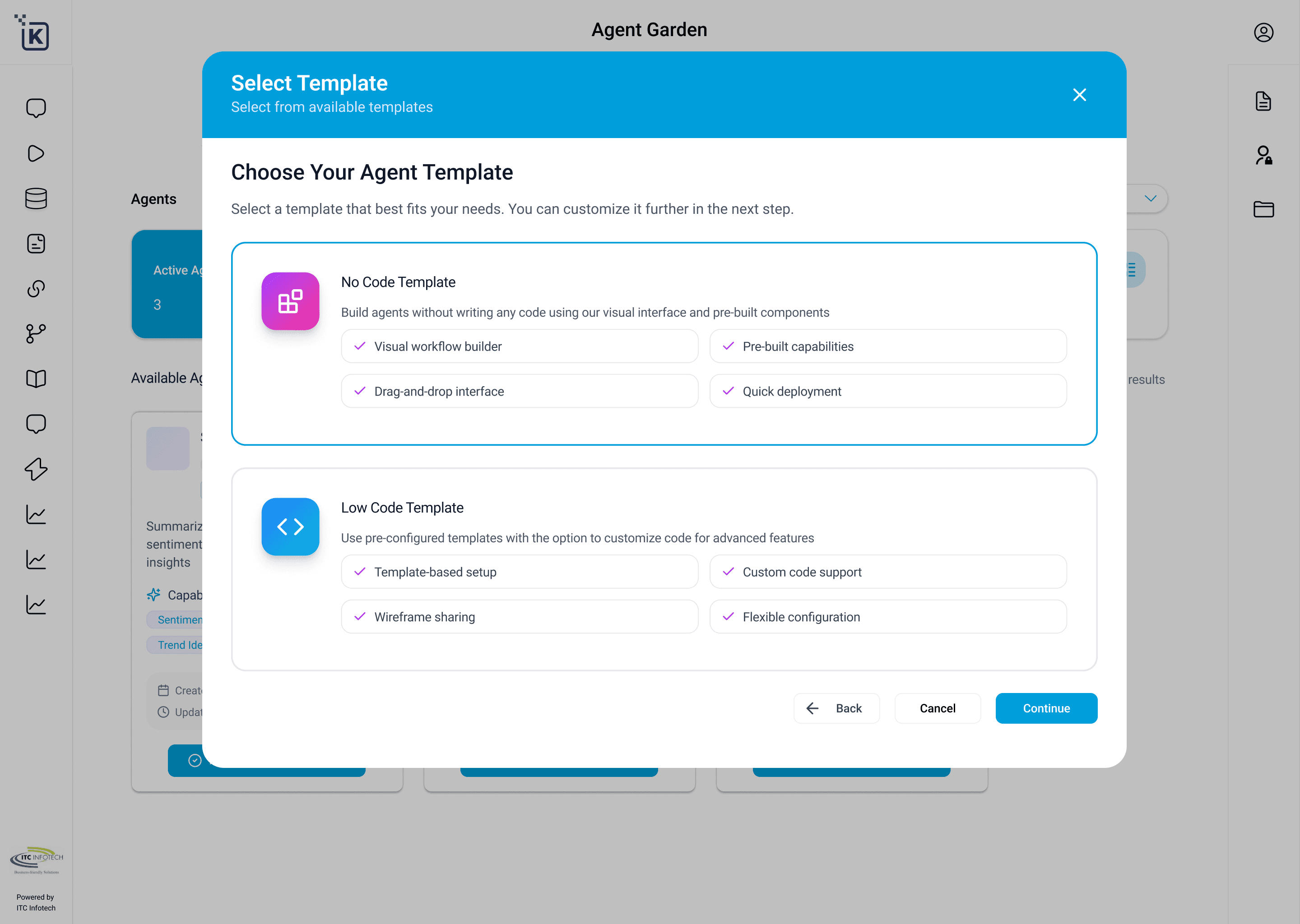
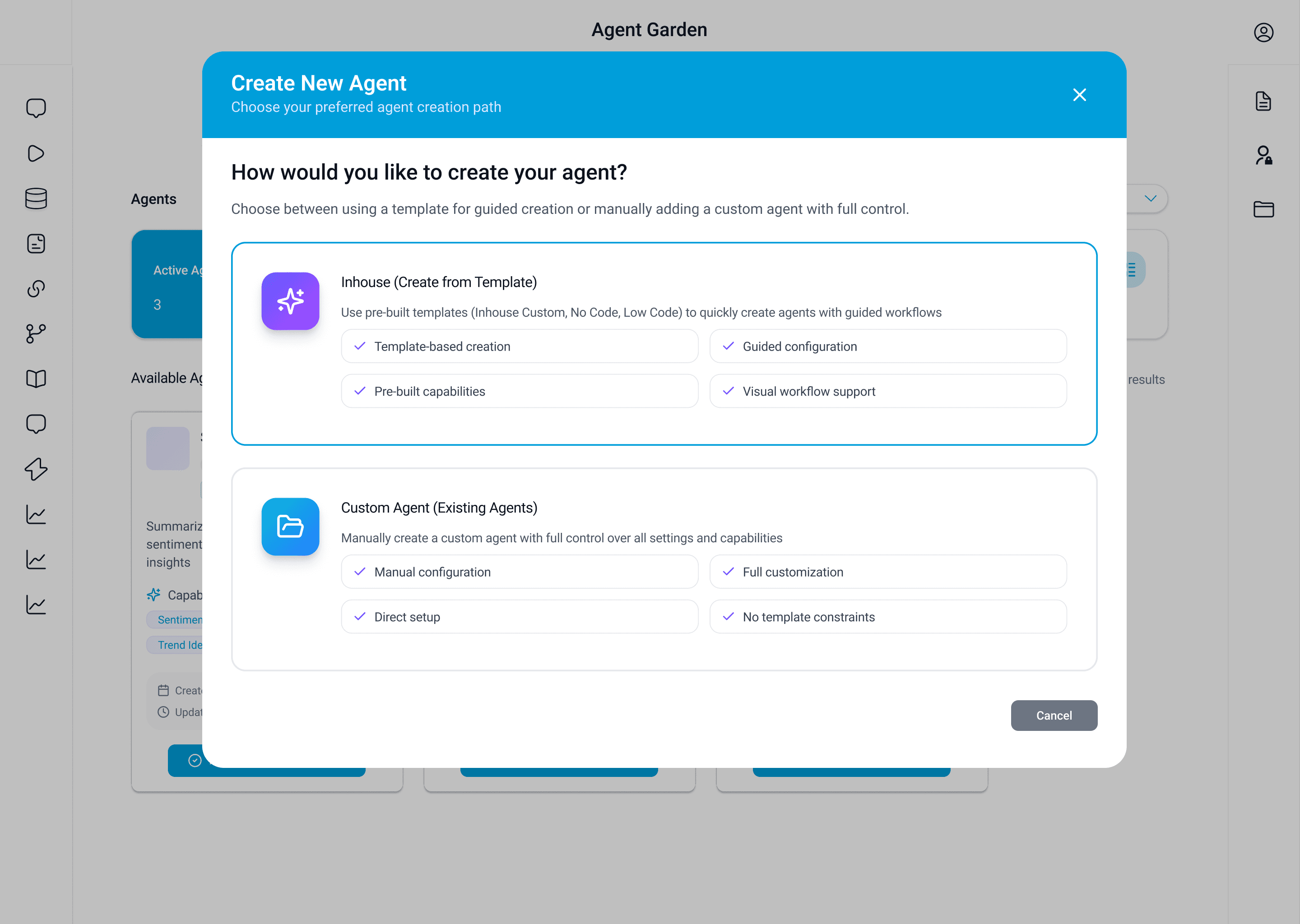
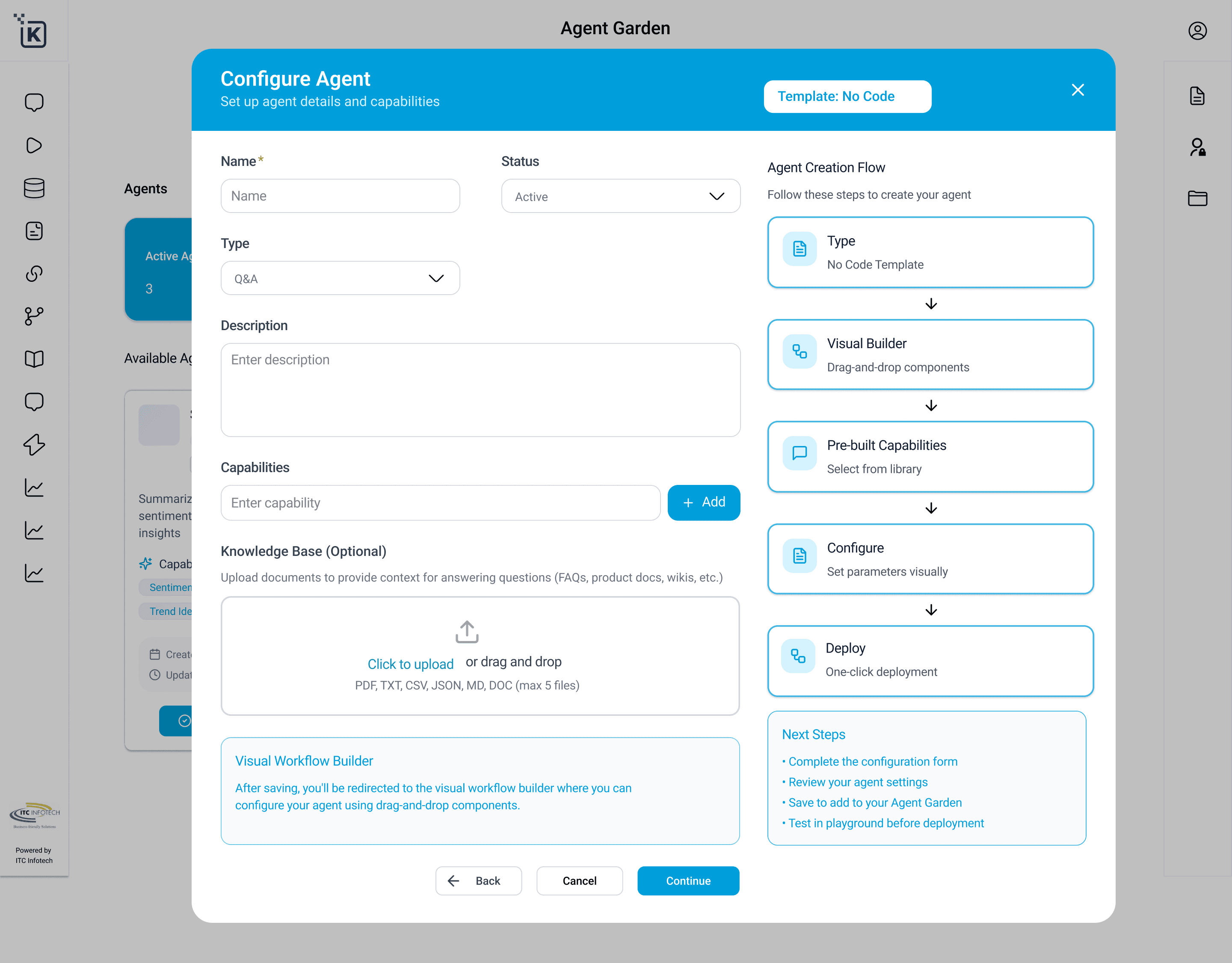
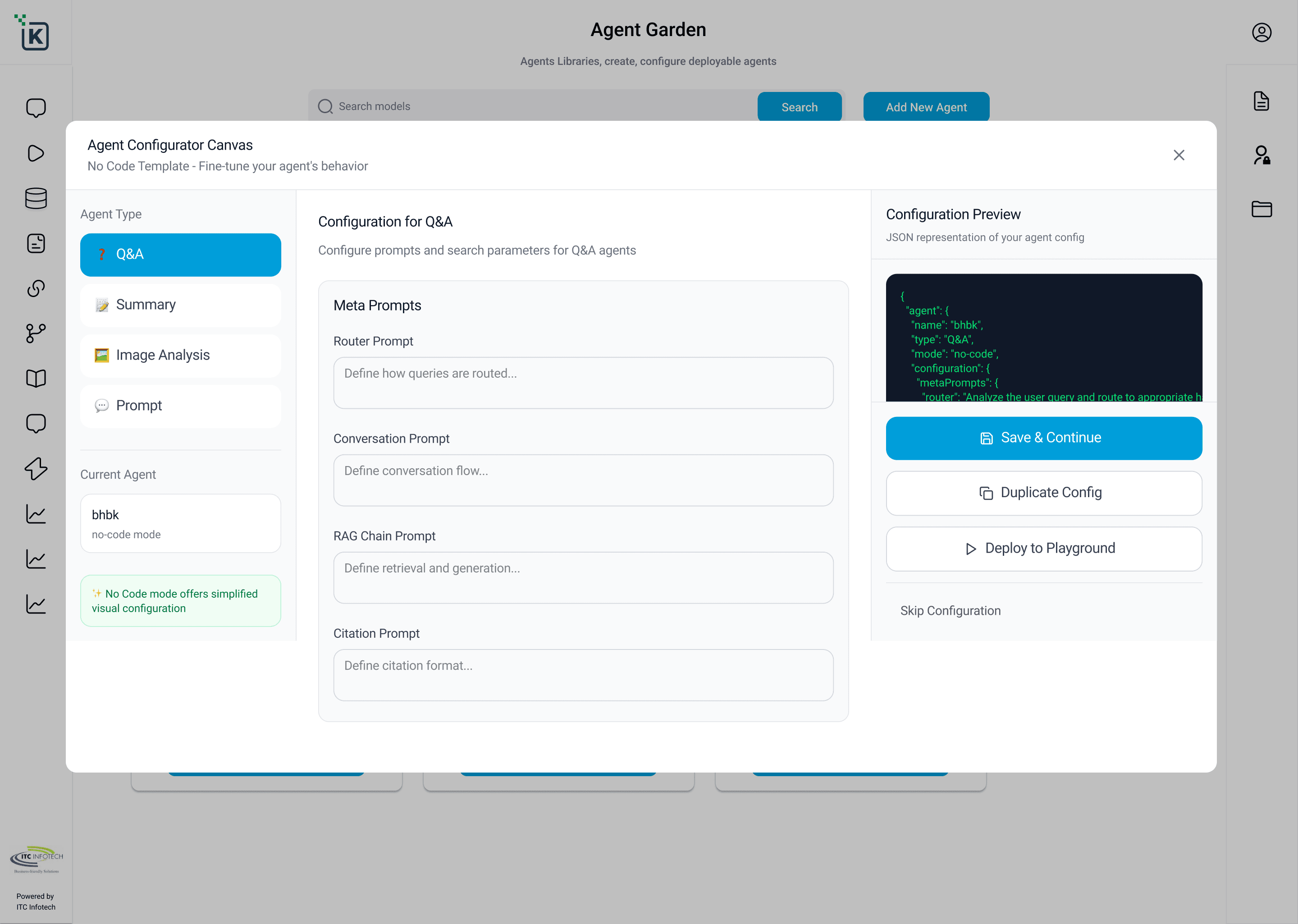
Agent Garden
Foundry to define, configure, and provision autonomous agents with specific capabilities and safety thresholds.
Connector Garden
Ingest enterprise databases (SAP, ServiceNow, SharePoint) securely to ground models without training.
Observability Garden
Monitoring dashboard tracking real-time API cost-per-project, system latency, and token consumption.
Evaluation Garden
Automated benchmarking suites to test and compare agent responses against quality and safety guidelines.
Playground Garden
Sandbox workspace to test, debug, and dry-run agent behaviors side-by-side before live deployment.
Governance Garden
Compliance ledger to configure security policies, PII filters, and manage human-in-the-loop approval queues.
KEY DECISION
The persistent left-rail navigation was a direct response to the context-switching loss I observed in shadowing sessions. Users evaluating a model while building an agent need both surfaces simultaneously. I made all Gardens accessible at all times. This is not a navigation convention — it is a research finding made structural.
Design Process & Timeline
The structural challenge was real: Nexus AI had 8 independent engineering teams, each with different release cadences and different levels of design maturity. I ran two parallel tracks from the start — feature design and design system — because I knew that without a shared system, consistency across 8 teams was impossible regardless of how good the individual designs were. Every sprint began with a system-level decision before a feature-level one.
DISCOVER & LEARN
Onboarding AI engine concepts, deconstructing prompt pipelines with developers, and conducting 26 interviews.
FRAME & ALIGN
Designing initial sitemaps, defining the one-pattern, eight-Gardens framework, and validating structural blueprints.
SCALE & MENTOR
Leading a team of 4 to design responsive interfaces across 8 modules, establishing workspace canvases.
SYSTEMIZE & HANDOFF
Building token architecture, crafting the system component library, edge-case audits, and developer handoff.
METHODOLOGY
I used JTBD as the primary scoping lens. The Prompt Garden is the clearest example: the natural product instinct was to build a rich prompt editor. The JTBD lens revealed the actual job — governed reuse, not authoring. That cut the scope in half.
Built Nexus AI design system from zero in parallel with feature design. Token architecture, spacing scale, component library (200+ components), and written governance documentation for engineers who had never worked with a design system before.
Core Feature Deep-Dives
Where developers evaluate models —
designing for consequential decisions
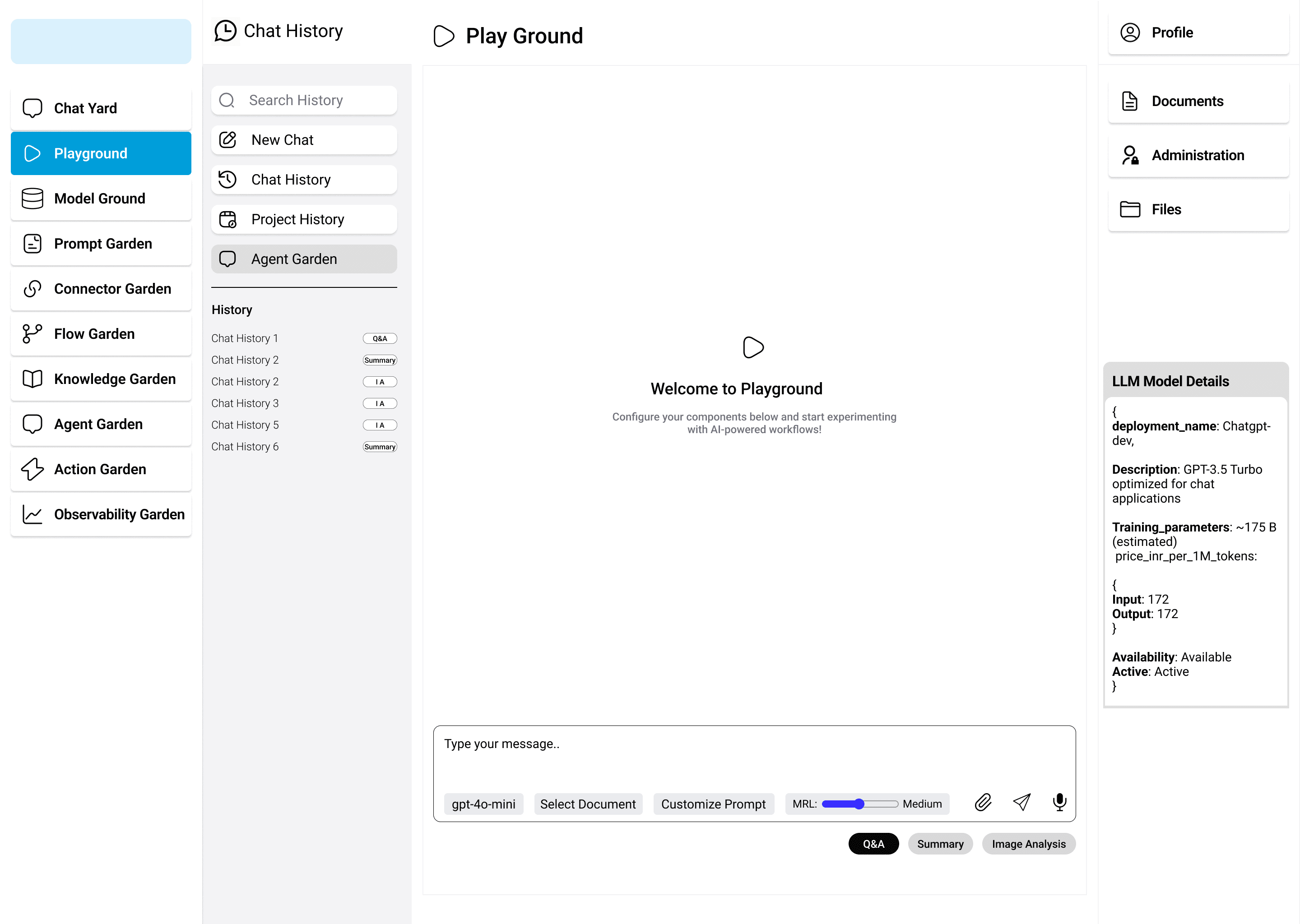
The Playground is where ERP developers and data scientists make a decision that affects everything downstream. I treated this as a high-stakes decision surface, not a sandbox. The typical pattern — a chat interface with a settings drawer — was wrong for this context. Model selection is not a preference. It determines RAG pipeline architecture, API cost structure, and latency tolerances. I made comparison a first-class interaction, not a secondary feature. Hyperparameter controls are always visible alongside output. Session history preserves the exact configuration used, because findings from evaluation need to be reproducible and shareable with the engineering team.
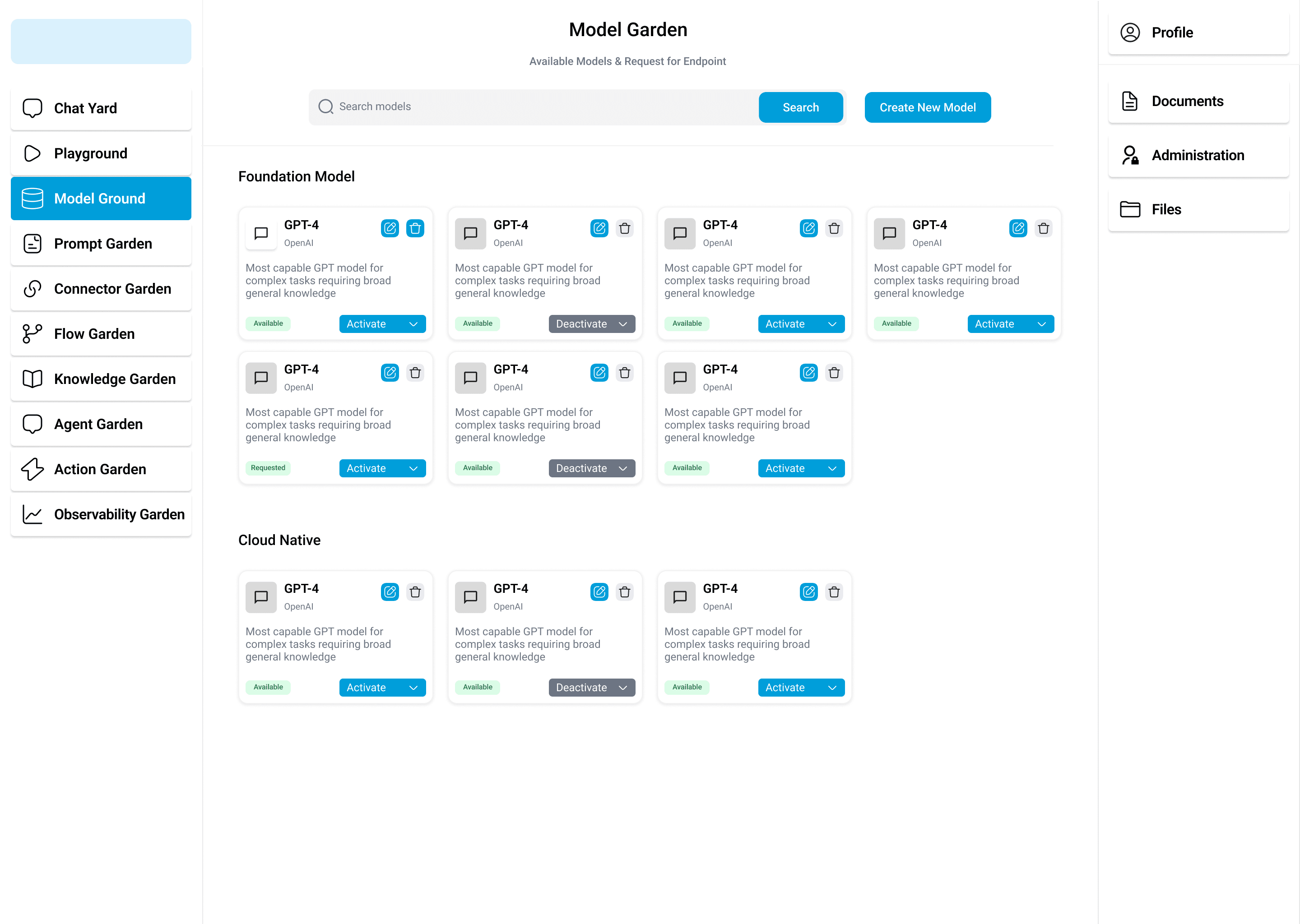
Making model discovery tractable —
across providers, use cases, and teams
Research finding: enterprise teams defaulted to the first model they set up, rather than the best-suited one, because model discovery and deployment were too fragmented. I designed the Model Garden as a governed activation directory, dividing models into clear tiers like 'Foundation Models' and 'Cloud Native'. Instead of a passive documentation page, I structured it as a live registry. Developers can search, check model latency/license parameters, and use a primary 'Activate/Deactivate' mechanism to configure their workspaces. Surfacing activation as a binary, audited state directly on the catalog cards helped administrators manage API token costs and enforce legal compliance before code was ever written.
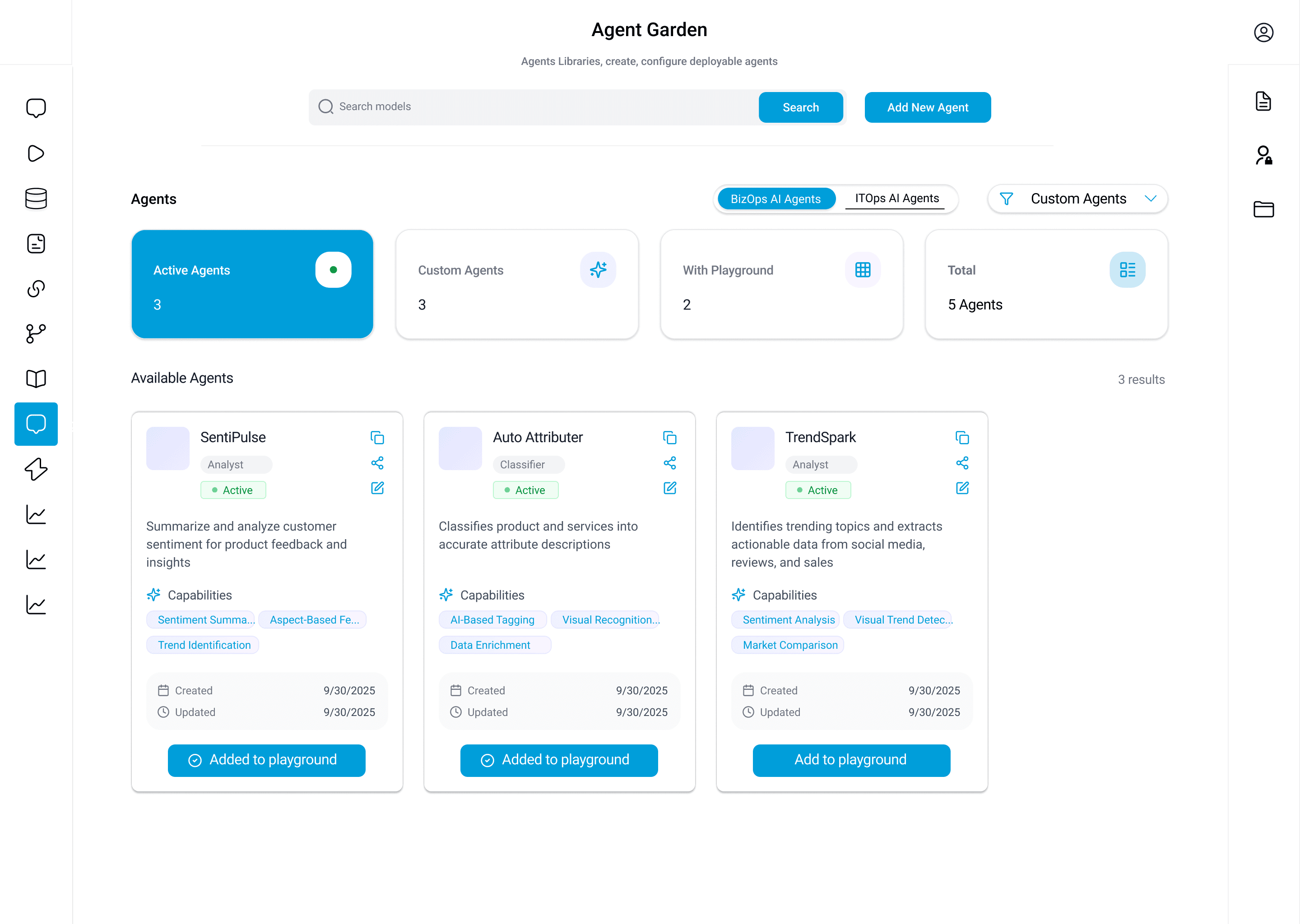
Moving AI from advisor to actor —
and making that auditable
Agent Garden was the hardest design problem. The promise — that AI could autonomously trigger API calls in ERP systems, booking platforms, and ITSM suites — was exactly what made compliance and legal teams nervous. I learned early that the governance requirement was not a constraint on the design: it was the design. The third sprint landed on a node-based visual workflow builder. Developers configure an agent's logic by adding and parameterizing sequential nodes: defining an Input Trigger, injecting Data Processing or Condition Check blocks, and configuring external API Calls. Every node parameter is structured inline. This canvas is simultaneously the configuration tool and the governance artifact. I argued for this framing explicitly: the compliance team was not signing off on a diagram. They were signing off on a complete decision log. That reframe closed the approval conversation.
.png&w=3840&q=75&dpl=dpl_94EARMTfpfLSPEUdQMU7ZVgy3Lsv)
Nexus AI Agent Orchestration Playground
Configure, run, and audit autonomous LLM workflows in real time.
Prompts as governed enterprise assets —
not individual artefacts
The research finding here was straightforward: teams were rebuilding the same prompts repeatedly because there was no mechanism for sharing, discovering, or building on each other's work. I pushed back on building a basic text editor. Prompt Garden is a catalog and governance layer first, an editor second. A variable system lets authors parameterise inputs — colleagues reuse a prompt with different values without editing the original, critical for regulated contexts where prompt integrity must be maintained. Version history gives teams confidence to iterate. Post-launch outcome: prompt reuse across teams increased 3.2× in 90 days.
interface PromptAsset {
id: string;
version: string;
variables: Record<string, string>;
isApproved: boolean;
lastRunResult: "SUCCESS" | "FAIL";
}
Interactive User Journey: Agent Deployment
The unified path to configure, test, and deploy a secure enterprise agent. We designed the interaction sequence to keep compliance checks transparent at every node.
Model Selection
User: User picks base LLM in Model Garden.
System: Displays performance tags, costs, and token latency curves.
Model RegistryData Ingestion
User: Connects databases (SAP, ServiceNow).
System: Validates DB schemas and establishes secure streaming indexes.
Connector GardenPrompt Parameterization
User: Sets prompt templates & variables.
System: Prevents direct text edits to maintain audit log integrity.
Prompt GardenNode Flow Design
User: Draws node sequences on flow canvas.
System: Calculates active input-condition-action logic parameters.
Agent BuilderLive Testing
User: Queries agent in Playground.
System: Streams token outputs and metrics side-by-side with variables.
Chat YardCompliance Scan
User: Evaluates guardrail and cost filters.
System: Auto-scrubs PII and matches run costs with limits budget.
ObservabilityOne-Click Rollout
User: Deploys to production channel (Slack, Teams).
System: Registers an immutable versioned audit signature in database.
Active SaaS APIWhat Nexus AI Moved
Metrics are from two sources: the 90-day post-launch beta cohort of 47 enterprise users; and published ITC Infotech client outcomes where Nexus AI was the primary delivery component. Every figure is attributed to its specific deployment context.
Baseline 51% from round 1 concept testing stage.
Cross-functional enterprise workflows (multi-domain database integrations).
Hospitality (TaaSH framework deployments, cloud PMS migration).
IT service desk triage when Nexus AI was integrated with ServiceNow.
Operational Transformation Matrix
| UX Parameter | Before Nexus AI | After Nexus AI |
|---|---|---|
| Governance Audit | No log history of model queries/PII leaks | Immutable, node-by-node visual decision trail |
| Deployment Time | 2-3 weeks of custom API and wrapper code | Under 30 minutes via Visual Flow Builder |
| Asset Reuse | Prompts copy-pasted and duplicated across silos | 3.2x increase in prompt reuse via Prompt Garden |
| Cognitive Load | Severe context switching between separate tools | Single pane of glass using Nexus AI design system |
Visual Flow Builder Adoption: The Agent Garden's visual flow builder was adopted by 3 IT Directors in the first two weeks of beta — people who had never previously interacted with agent orchestration tooling. The governance requirement I had fought for — full audit logs per node — was cited as the specific feature that unlocked internal approval for agentic deployment. The compliance team approved it in one review.
Prompt Reuse Quality Culture: The Prompt Garden created an organisational behaviour I had not designed for: teams began annotating and peer-reviewing each other's prompts, forming an informal quality culture around the shared catalog. That emerged entirely from the reuse structure. It was the most satisfying thing I observed post-launch.
Observability & Budget Conversations: The Observability Garden gave compliance and finance stakeholders their first real-time view of AI usage costs and agent decision paths. Within 60 days of launch, platform admins were using it to run budget conversations with leadership that had previously required weeks of manual reporting.
What I got wrong, and what I would change
LATE COMPLIANCE INVOLVEMENT
I involved compliance too late. The governance requirements that shaped the Agent Flow Builder — audit logs, budget caps, approval gates — emerged late from stakeholder reviews rather than research. Had I involved compliance leads in round 1 alongside technical users, those constraints would have informed the IA from the start. Instead, they were retrofitted. It cost two sprints of rework.
DESIGN SYSTEM TIMING
I started the design system at week 6. I should have started the token architecture at week 1. Even a rough spacing scale and colour token set in sprint 1 would have prevented the rework I did when early feature screens were redesigned to system standards. With 8 independent engineering teams, inconsistency compounds fast.
CONSULTING-LED PATH FOCUS
I designed for the consulting-led deployment model and only that. Nexus AI is currently deployed through ITC Infotech Experience Centers with professional services support. A self-serve SaaS path is the natural next evolution — and every empty state, onboarding flow, and error message will need to work without a consultant in the room. I would advocate for designing that path in parallel from day one, not as a future phase.
UI Showcase: Live Garden Workspaces
A visual catalog of high-fidelity interface layouts designed across the three primary workspaces of the platform. Select a category below to explore the Agent Foundry builder, observability reports, and action fine-tuning pipelines. Click any image to view details in full screen.
.png&w=3840&q=75&dpl=dpl_94EARMTfpfLSPEUdQMU7ZVgy3Lsv)
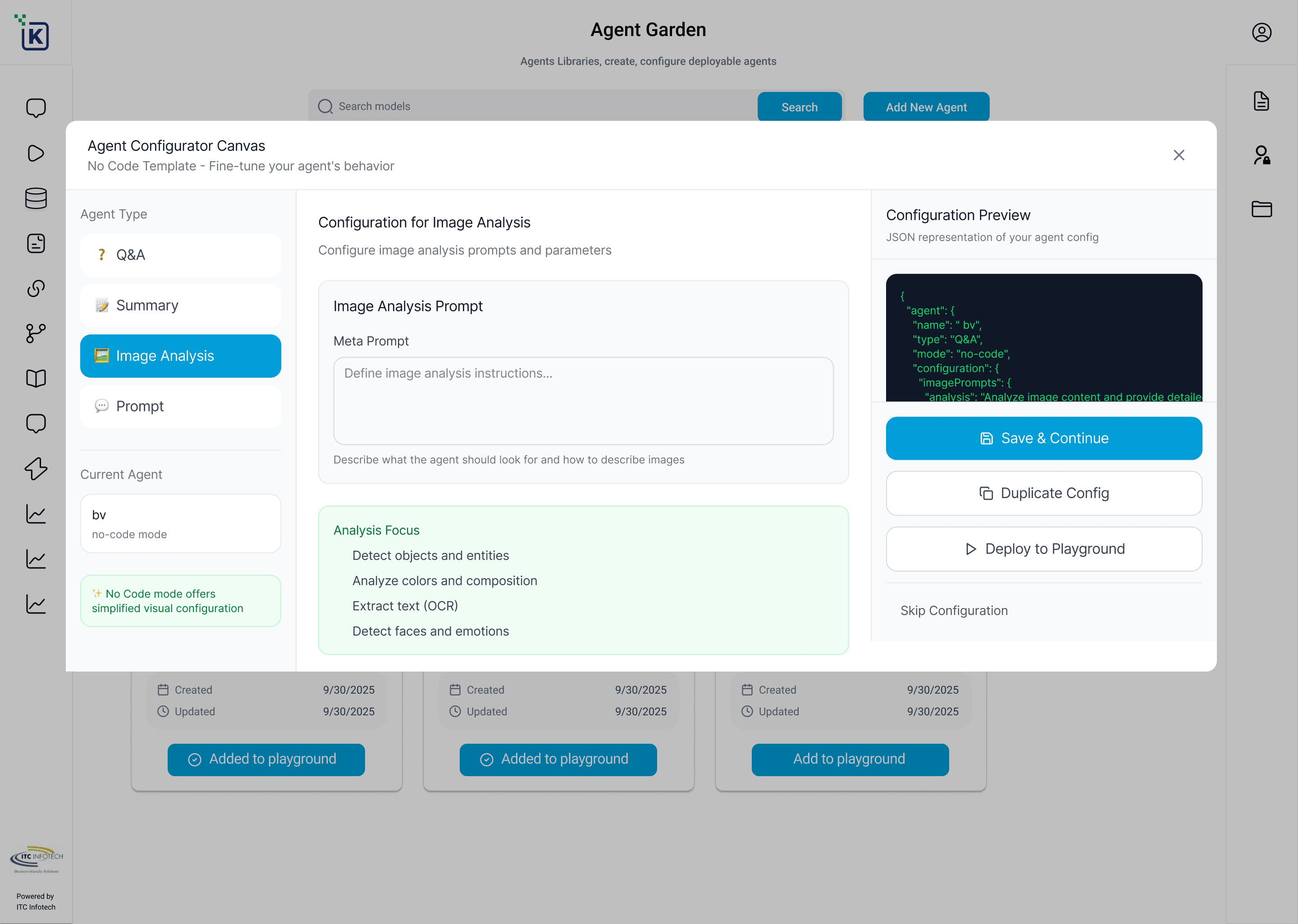
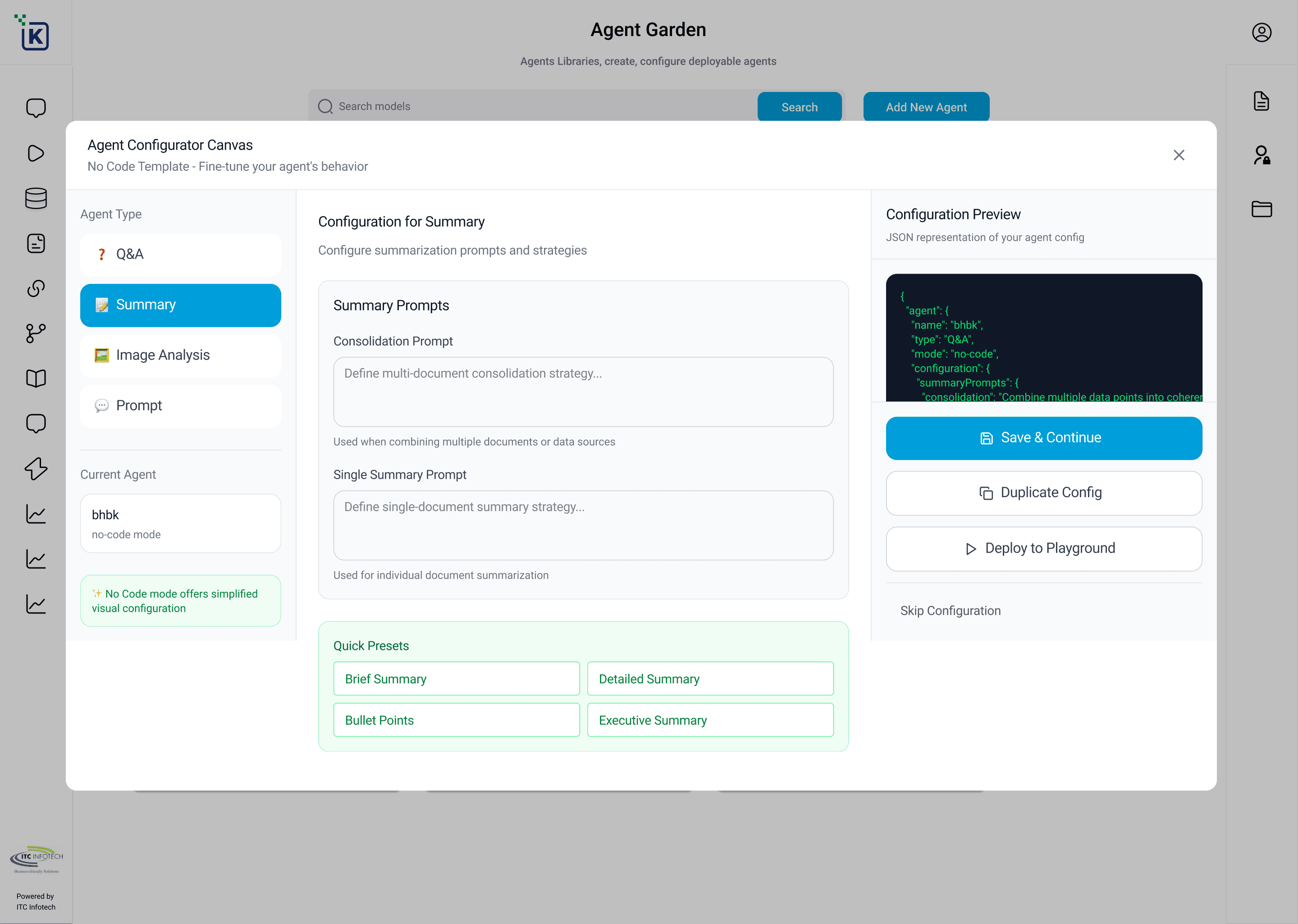
Nexus AI Design System: Tokens & Component Library
Consistency across 8 independent workspaces is maintained by a strict set of design tokens and reusable UI components. Inspired by Material Design 3, this system defines color behaviors, typography scales, elevation guidelines, outline vector iconography, and micro-interaction parameters that guarantee a seamless, accessible experience.
Color Theory & Semantics
Following WCAG 2.1 AA contrast rules, we utilize a Midnight Navy base for dark modules, Warm Cream for panels, and a 100% saturated Brand Cyan for action nodes. Click any swatch below to copy its Hex token.
Typography Hierarchy
Dual font-system utilizing Outfit for primary layout titles and Inter for text interfaces and console terminals.
Buttons & Interaction States
Hovering over buttons triggers active micro-interactions (elevation shift, border glow, shadow expansion).
Interactive Components
A live functional switch component validating how the design handles active model grounding states. Click the switch below.
Iconography System
Custom vector outline assets designed on a uniform 24px grid layout. Outline weights are fixed to 1.75px for structural consistency.
Motion & Transitions
A single easing cubic curve regulates all layout micro-interactions to prevent visual noise.
Ecosystem Feedback
Perspectives from users, colleagues, and stakeholders.
"An incredible design milestone. The unified visual architecture of Nexus AI not only solved our context-switching bottleneck but drove a 70% faster feature launch. Truly outstanding work!"
"A massive achievement for our enterprise governance rollout. The visual decision trail is brilliant—compliance signed off immediately because the design itself serves as the perfect audit log. Superb!"
"I'm so proud to have contributed to this platform. The clean token system and modular guidelines you set made it easy for us to scale to 8 modules while keeping the visual quality top-notch. Inspiring leadership!"
Have thoughts on this?
Whether it's a critique, an idea, or a potential collaboration, I'd love to hear your perspective.